
Loading
Loading
The TIMIFY Mobile App — every essential from the Web App, tuned for the go.


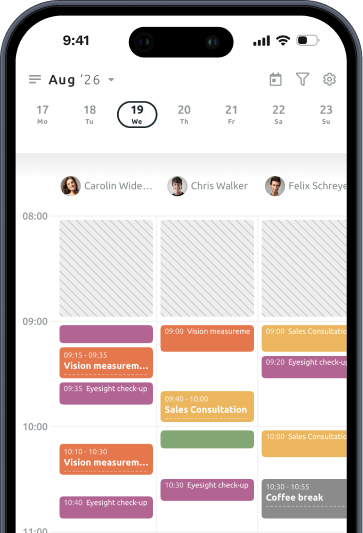
The TIMIFY Mobile App is the on-the-go version of the Web App — every daily operational task, tuned for iOS and Android.
Built for branch managers, floor staff, and anyone who runs their schedule from their phone.

Check appointments, manage the calendar, handle walk-ins — from wherever you are.
Reschedule, cancel, create appointments in seconds. No waiting for the office.
Customer records, contact details, booking history — one tap away.
SSO with Microsoft, 2FA, and Face ID — enterprise security in your pocket.
Scroll through the core journey — calendar, appointments, customers, security. Every screen is one tap away.
See your calendar with one tap. Filter by staff, resource, or view the whole floor. Preview one branch or several.
Tap an empty slot on the calendar. Fill in the service, pick a customer, save. New appointment in seconds — no booking widget round-trip.
Add a shift, holiday, or absence in seconds. Configure who's off, for how long. Every colleague sees the update instantly.
Add a new customer directly from the app. Name, contact, tags — save in one screen.
Tap the appointment. Update the service, the resource, the customer, the notes. Save. Done.
Tap the red plus button. Pick a service, and the widget finds the fastest available slot across all matching resources. Book instantly.
Search or browse every customer. Tap into their record for booking history, notes, and past interactions.
Microsoft SSO. Two-factor authentication. Face ID or Touch ID unlock. Enterprise-grade security by default.

Every action attributable and logged. Auditability comes as standard.
HQ or regional managers can authenticate into any branch's app account as super admin.
Available in 17 languages, with the option to extend for your organisation.
What teams want to know before rolling the TIMIFY Mobile App out to the floor — by topic.
Download the mobile app for iOS or Android.